P360
Patinga360
Marketing to Sales & Admissions
How It Works · The 360 Journey

Follow a campaign from the first idea to the final outcome.

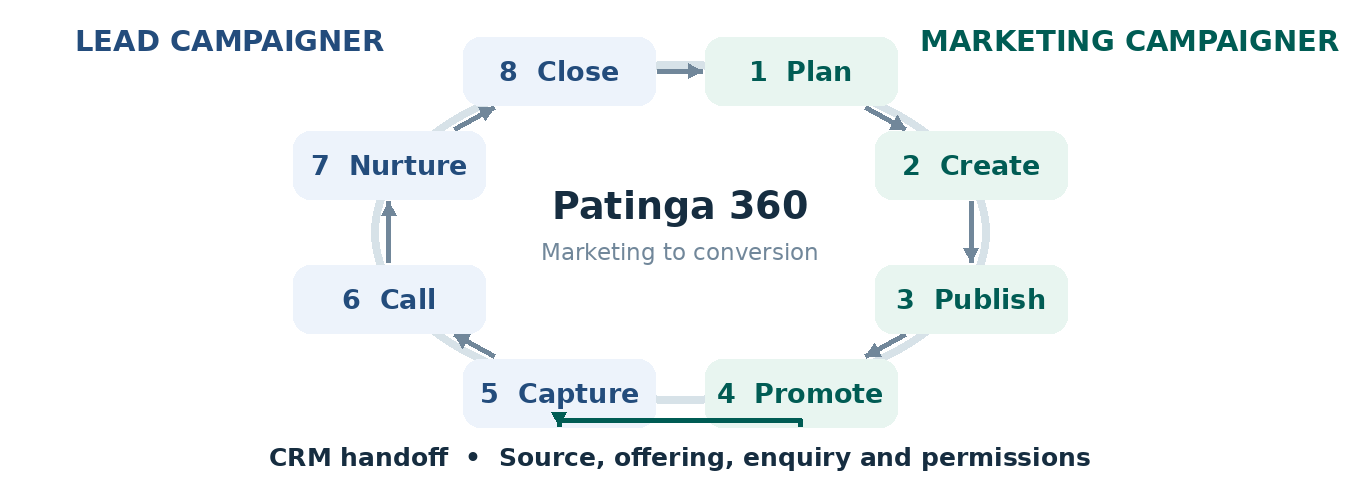
Patinga 360 unites two workstreams — Marketing Campaigner (Stages 1–4) and Lead Campaigner (Stages 5–8) — with an automatic CRM handoff that preserves the campaign source, offering, original question and contact permissions.

360°
The Eight-Stage Patinga 360 Journey & CRM Handoff
Stages 1–4 run in Marketing Campaigner · Stages 5–8 run in Lead Campaigner
← Lead Campaigner (Stages 5–8)Marketing Campaigner (Stages 1–4) →
The eight-stage Patinga 360 journey and CRM handoff between Marketing Campaigner and Lead CampaignerThe eight-stage journey and the CRM handoff between the two workstreams.
CRM Handoff (Stage 4 Promote → Stage 5 Capture):
Carries Campaign, Source, Creative, Offering, Original Question & Permissions into the Lead Record.
Marketing CampaignerStage 1 of 8 · #plan

1. Plan

Choose a product, service or intake. Compare campaign approaches backed by market & audience evidence and approve an objective, audience, timing and budget.

Stage Output Delivered
Approved Campaign Brief, Strategy Option & Publishing Calendar

All Eight Stages in Detail (#plan to #close)

Direct anchor links work across desktop and mobile in linear reading order. Stage 8 uses “Admit” in the Education view and “Close” in the Business/Global view while keeping #close stable.

Stage 1 · Marketing Campaigner#plan

1. Plan

Choose a product, service or intake. Compare campaign approaches backed by market & audience evidence and approve an objective, audience, timing and budget.

Output: Approved Campaign Brief, Strategy Option & Publishing Calendar
Stage 2 · Marketing Campaigner#create

2. Create

Turn an approved brief and assets into channel-ready drafts, posters, carousels, short-form Reels, UGC storyboards and localized variants.

Output: Reviewed Posters, Carousels, Reels Storyboards & Landing Copy
Stage 3 · Marketing Campaigner#publish

3. Publish

Review copy, assets, destination and schedule. Publish through connected Facebook, Instagram, YouTube and Google Business Profile channels after approval.

Output: Live Social Posts, Location Updates & Triaged Community Replies
Stage 4 · Marketing Campaigner#promote

4. Promote

Review paid campaign, tracking and audience eligibility across Meta, Google Search (exact-match policy) and YouTube. Start approved creative hook tests and review results.

Output: Verified Paid Campaigns, A/B Hook Experiments & Retargeting Pools
Stage 5 · Lead Campaigner#capture

5. Capture

A valid enquiry from web forms, ad forms, social inbox, chatbot or imports creates or updates a deduplicated lead with campaign, source, original question and preferences.

Output: Source-Attributed Lead Record with Named Owner & Due Time
Stage 6 · Lead Campaigner#call

6. Call

Check contact eligibility and IVR preference. Assign an owner and choose a Staff-only, AI-assisted or Hybrid route in the lead’s preferred language. Capture the outcome and next action.

Output: Recorded Call Outcome, Transcript Summary & Scheduled Callback/Visit
Stage 7 · Lead Campaigner#nurture

7. Nurture

Send approved brochures, catalogues, event links and reminders via WhatsApp, SMS or email where eligible. Coordinate callbacks, campus visits, demos, field check-ins or proposals.

Output: Delivered Brochures, Field Visit Check-In Notes & Follow-Up Tasks
Stage 8 · Lead Campaigner#close

8. CloseEducation: Admit · Business: Close

Record a sale or verified admission after application/proposal and payment verification. Review outcomes by source and cohort and use the findings in the next campaign.

Output: Confirmed Admission / Won Deal & Full-Funnel Source Attribution Report
Worked Enquiry Handoff (Stage 4 → Stage 5)

What crosses from Marketing Campaigner into the Lead Record

When a prospective student, parent, or business buyer submits a short form or requests a private callback, Lead Campaigner never starts blank:

  • Campaign & Creative Origin: Which strategy plan, Reel, Google listing, or search ad generated the response.
  • Offering & Campus/Branch Location: Specific course intake (e.g. BCA 2026 · Jayanagar Campus) or business service package.
  • Original Question & Preferences: Exact comment or question asked, preferred callback language (e.g. Kannada), and preferred time window.
  • Named Owner & Due Timestamp: Automatic or manual assignment with overdue escalation alerts for managers.
Approval & Governance Model

Four checkpoints where human reviewers stay in control

  • 1. Strategy Plan Sign-Off: Reviewer compares 3 evidence-linked options and approves the calendar before creative production.
  • 2. Mentor & Creative Release Check: Faculty mentors verify campus activity facts; any material revision after sign-off returns to the reviewer.
  • 3. Paid Budget & Tracking Pre-Flight: Forms, UTM tags, and exact-match search rules are verified before ad spend is activated.
  • 4. Authorised Closure Verification: Designated college or sales staff confirm document/proposal and payment status before recording a closed outcome.