Follow-Up & Field Operations
“Keep the promise made on the last call.”
WhatsApp, SMS, email brochures and reminders, outcome-based follow-up plans, field executive visit assignments, location check-ins, manager workload views and pause/stop logic.
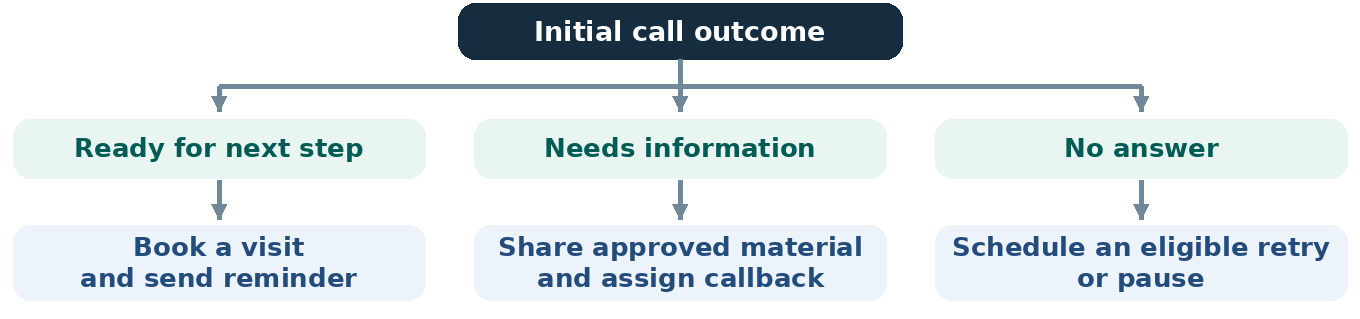
Sample follow-up paths after an initial conversation.
Select an Initial Call Outcome to See the Automated & Field Action Path
Assigns Field Executive Ravi Kumar for Saturday 11:00 AM Jayanagar Campus visit. Sends WhatsApp location pin & 24h reminder. Once checked in, reminders pause automatically.
Why teams struggle without this step
Promised brochures aren’t sent after a call, field visits happen without feedback to the inside sales owner, or automated messages keep firing after a lead converts or opts out.
What feeds into Follow-Up & Field Operations
- Last Call Outcome & Promised Next Step (Ready for next step, Needs information, or No answer)
- Approved Collateral Library (course brochures, service catalogues, open-day event links, FAQs)
- Channel-specific consent & eligibility flags for WhatsApp, SMS, Email and Voice retries
How Follow-Up & Field Operations works step by step
Ready for next step → Book a visit/demo and send reminder. Needs information → Share approved material and assign callback. No answer → Schedule an eligible retry or pause.
Send brochures, event links and reminders via configured WhatsApp, SMS or email when eligible, recording sent and delivery status.
Assign a field executive (BDO) for campus outreach or client visits, accept appointment details, record location check-in/out for visit verification, capture notes and return the next action to the lead owner.
Paused, converted or opted-out contacts exit automated messages and retries immediately with per-channel eligibility controls.
Capabilities & Public Demonstration Matrix
| Capability / Scenario | Configured Workflow & Output |
|---|---|
| Communication and reminders | Share approved brochures, catalogues, event links, FAQs and reminders via configured WhatsApp, SMS or email when eligible. Record sent and delivery status. |
| Follow-up plans | Interested leads to a demo/visit. Needs information leads to approved material and a callback. No answer leads to a permitted retry by policy. |
| Field team operations | Assign a field executive, accept the visit, add appointment details, check in and out where enabled, capture notes and return a next action to the lead owner. |
| Manager view | Show overdue actions, open workload, completed callbacks, visit outcomes and reassignment while keeping the same lead history. |
| Pause and stop logic | Paused, converted or opted-out contacts exit applicable messages and retries immediately using separate eligibility controls for each channel. |
Unified Activity Timeline & Field Visit Handback
- Timeline Event 1 (6:04 PM): Approved BCA Brochure PDF + Saturday Open-Day Pass delivered via WhatsApp (Status: Delivered).
- Timeline Event 2 (Saturday 11:15 AM): Field Executive Ravi Kumar checked in at Jayanagar Campus Counseling Desk; parent & student attended lab tour.
- Timeline Event 3 (Saturday 12:00 PM): Visit outcome logged ("Ready for Application"); next action returned to Counsellor Anita Rao with application checklist.
Brochure Sent → Saturday Campus Visit Checked In → Application Handback
Following the 6:00 PM call, the parent asked for the BCA brochure and booked a Saturday 11:00 AM campus visit.
- Location capture during field visits is used transparently to verify appointment check-in/out and coordinate territory workload.
- A missed visit or call failure retains the original owner, outcome and next step — or triggers explicit manager reassignment.
- Delivery receipts depend on connected WhatsApp Business, SMS and Email provider webhooks.
- Separate opt-out and pause controls are enforced per communication channel.